
Where the Get ₹500 button is
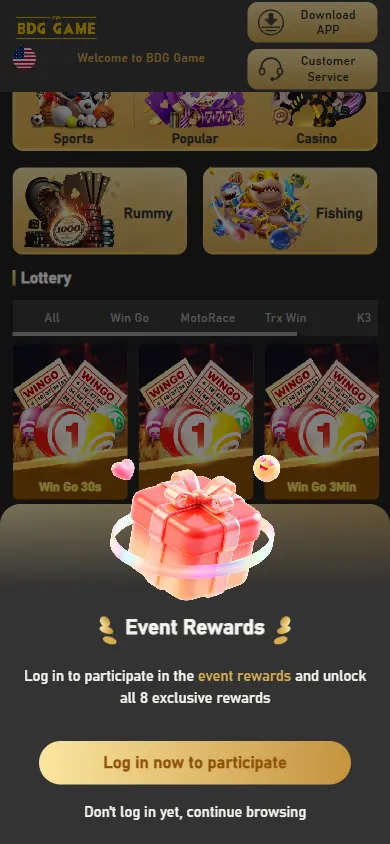
The button stands in the centre of the bottom menu. Before login it opens a window that invites players to sign in for event rewards.
- Log in to your account.
- Press the central button.
- Read the event rules.
- Note the amount, the turnover and the deadline.
- Decide before the deposit.
The window before login mentions eight rewards and gives no conditions. The conditions appear inside the account, so treat the sum on the button as an advertisement until you read them.
BDG Game 500 bonus conditions to check
Five conditions decide what the offer is worth. Write each one down before you press Claim.
| Condition | Question | Why it matters |
|---|---|---|
| Amount | Exact sum or a ceiling | “Up to” is not a sum |
| Trigger | Login, deposit or invites | Cost of entry |
| Turnover | How many times | Cost of withdrawal |
| Games | Which count | Stakes outside the list are lost for the offer |
| Deadline | Hours or days | The rest expires |
The operator can change these points. Check the page on the day you claim, not in an old article.
RegisterPartner site, may differ from BDG Game. 18+. Gambling leads to losses. Responsible gaming
How turnover changes a ₹500 reward
Turnover is the sum of stakes before a payout. The example uses its own numbers to show the arithmetic.
Suppose a reward of ₹500 needs a turnover of ×20. You stake ₹10,000 in total. At an average return of 96% those stakes cost ₹400, so the reward leaves ₹100 on average. At 90% the same stakes cost ₹1,000, and the reward does not cover them.
| Average return | Stakes | Average cost | Left from ₹500 |
|---|---|---|---|
| 97% | ₹10,000 | ₹300 | ₹200 |
| 96% | ₹10,000 | ₹400 | ₹100 |
| 95% | ₹10,000 | ₹500 | ₹0 |
| 90% | ₹10,000 | ₹1,000 | Minus ₹500 |
Averages hide swings. Many players lose the whole reward before the turnover ends, so use only money you can lose.
BDG Win login 500 bonus and BDG 500 APK
Searches for a 500 bonus with a login or an APK mix two things. Login opens the account, and the event inside it can add a reward. An APK is a file and adds nothing.
Files with “500” in the name come from strangers. They show a fake balance, ask for a deposit to unlock it and disappear. The Android package from the lobby has no bonus inside the file.
Signs of a false ₹500 offer
A false offer shows a balance before registration, asks for a fee or requests an OTP. It also limits you to minutes. Close the page when you see two of these signs.
A payment “to verify the account” never returns. Report the number to your bank and keep the screenshot.
Attendance bonus, gifts and VIP rewards
Attendance grows with consecutive days of sign-in. Gifts need a code, and VIP levels give rewards for turnover. The published VIP1 screen shows a level-up reward of 60, a monthly reward of 5 and a rebate rate of 0.05%.
| Reward | What starts it | Where it is |
|---|---|---|
| Get ₹500 | Event rules | Central button |
| Attendance | Daily sign-in | Activity |
| Gift code | A code | Activity, Gifts |
| VIP | Turnover | Account |
A rebate of 0.05% returns ₹5 from ₹10,000 of stakes. Compare that with the average cost of the same stakes before you chase a level. The code field and its errors and the levels of the partner program pages describe the other two rewards.
Who should skip the 500 bonus
Skip the offer if you want to withdraw a small win quickly, because an active turnover can hold the balance. Skip it too if the list of games excludes the one you play.
| Player | Better choice | Reason |
|---|---|---|
| Tests a payout | Deposit without a bonus | No turnover before the request |
| Plays 30-second rounds | No bonus | The turnover ends fast and costs more |
| Has a fixed weekly sum | Compare the turnover with that sum | A larger turnover breaks the limit |
| Plays slots from the list | Read the deadline | Enough days are needed |
A refusal costs nothing. You can ask support whether an offer starts by itself after a deposit, and you can write that you do not want it. Keep the answer, since it helps in a dispute about a blocked balance. Players who already started an offer can finish it, let the deadline pass, or ask support to cancel it. Cancellation can remove the reward together with winnings from it, so read that line in the rules before you send the request.
Bonus balance and cash balance
A lobby can keep two sums: cash that you deposited and a reward that still needs a turnover. The withdrawal page shows the withdrawable part. Compare the two lines before each session, and note which sum the game spends first, because the order changes what remains after a loss.
What to do after you claim a reward
Open the bonus history and save the start time, the sum and the required turnover. Check the list of games, because a stake outside it does not count.
- Choose one game from the list.
- Set a stake limit.
- Watch the progress line.
- Stop at the deadline.
- Request the payout with your own bank name.
Ask support in writing if the progress line does not move. Attach the period number or the game round. A payout test belongs after the bonus, and the request, status and bank days page shows the timing.